
webard / filament-translatable
Highly customizable Translation component for Filament PHP.

Installs: 232
Dependents: 0
Suggesters: 0
Security: 0
Stars: 2
Watchers: 0
Forks: 0
Open Issues: 0
pkg:composer/webard/filament-translatable
Requires
- php: ^8.3
- filament/filament: ^4.3.1|^5.0
Requires (Dev)
- astrotomic/laravel-translatable: ^11.16
- driftingly/rector-laravel: ^2.1
- larastan/larastan: ^3.0
- laravel/pint: ^1.0
- orchestra/testbench: ^9.16|^10.0
- pestphp/pest: ^4.2
- pestphp/pest-plugin-laravel: ^4.0
- pestphp/pest-plugin-livewire: ^4.0
- spatie/laravel-translatable: ^6.12
Suggests
- astrotomic/laravel-translatable: Alternative way for handling translations in Laravel using separate database tables.
- spatie/laravel-translatable: For handling translations in Laravel using JSON fields.
This package is auto-updated.
Last update: 2026-02-12 11:25:31 UTC
README
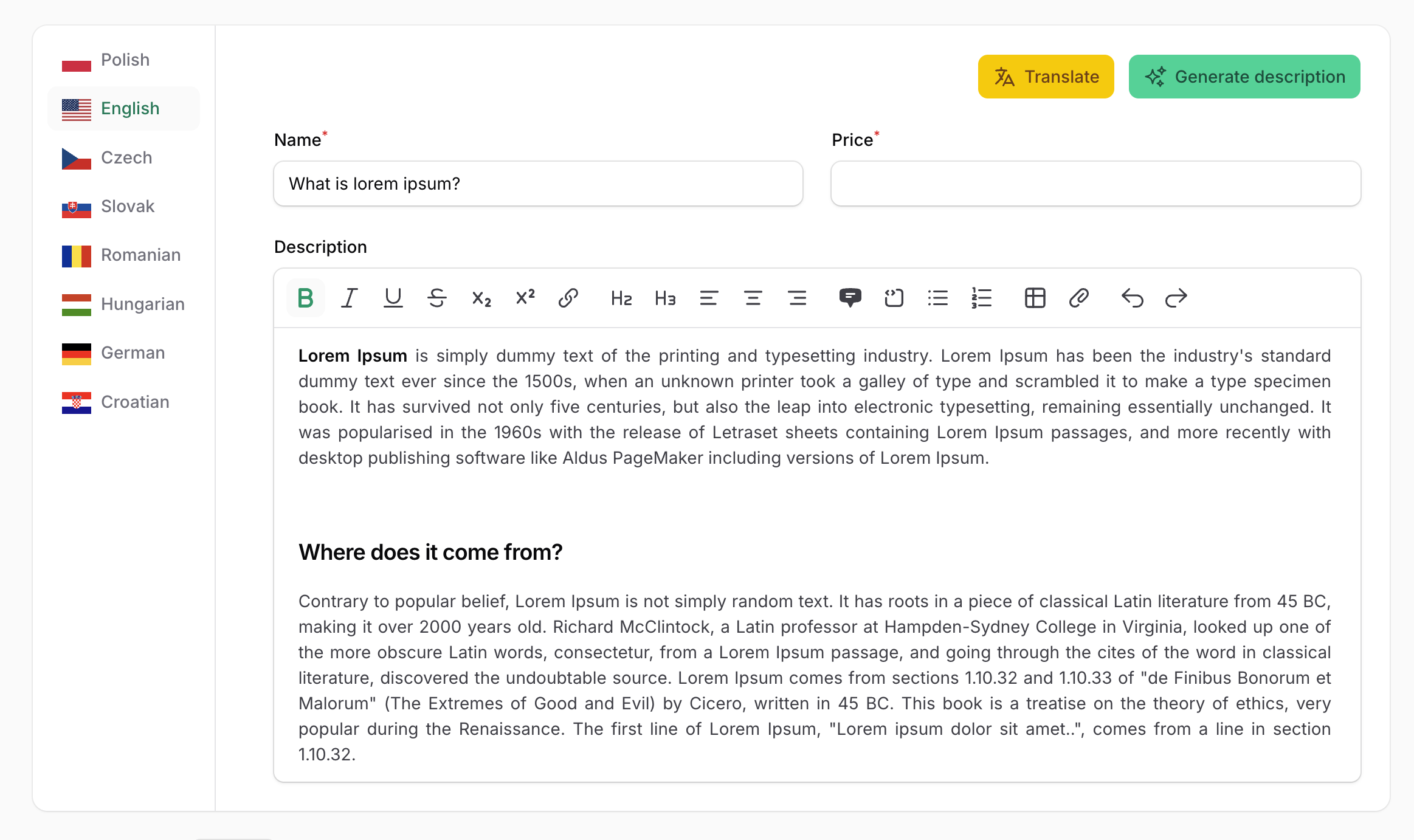
Filament Translatable is a flexible package that provides a complete solution for managing multilingual content in Filament admin panels. It allows you to easily create translatable form fields with an intuitive tabbed interface, supporting multiple locales and translation packages.
Key Features
- Multiple translation backends — supports both spatie/laravel-translatable and astrotomic/laravel-translatable
- Two usage modes — use the quick
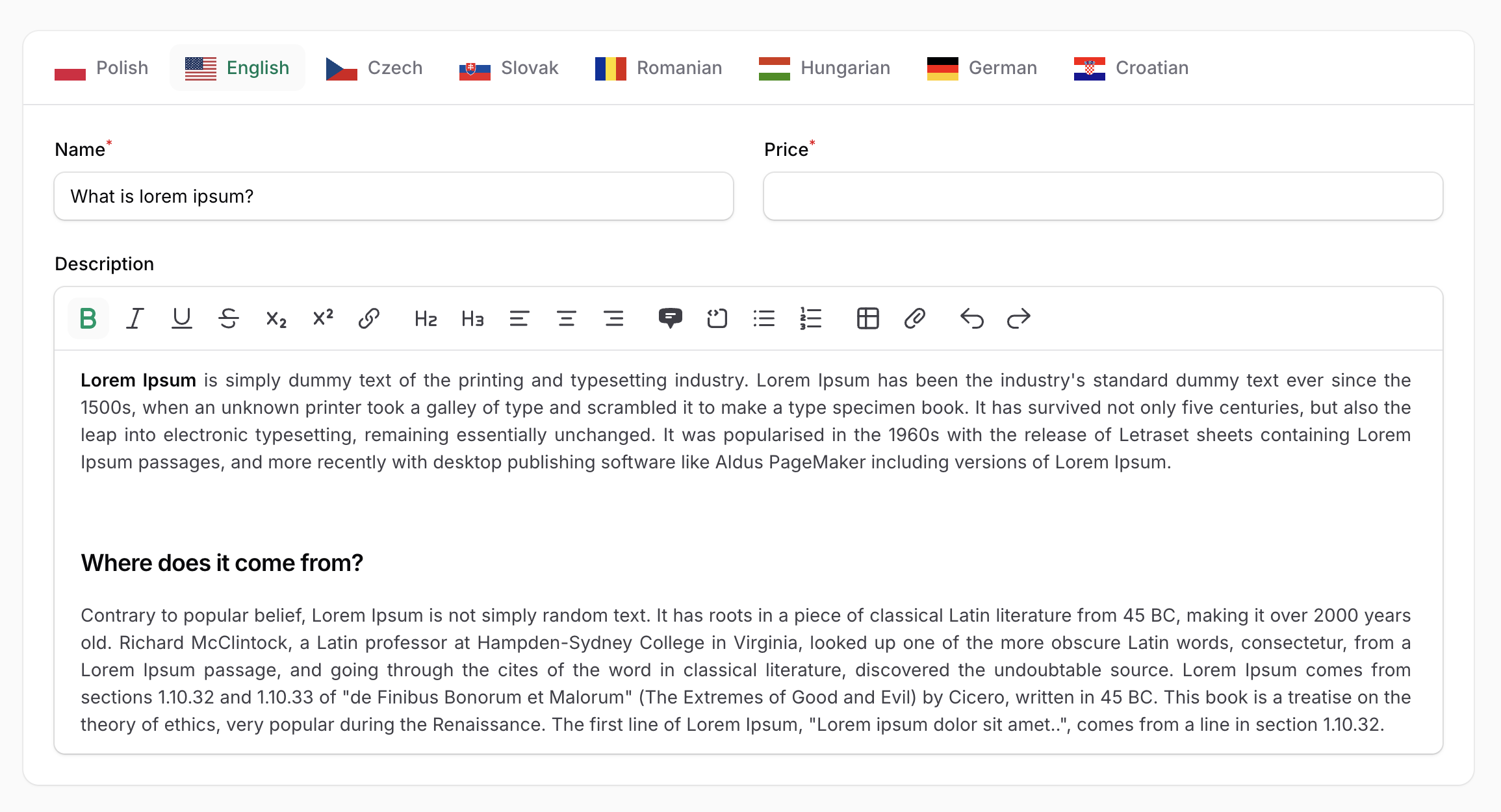
translatable()macro on any field, or the fullTranslationscomponent for advanced scenarios - Locale tabs with flags — display translations in horizontal or vertical tabs with optional country flag icons
- Flexible locale configuration — define locales globally or per-component, with custom labels
- Required locale validation — mark fields as required for specific locales or only for the default locale
- Field decoration per locale — customize field appearance (prefix, suffix, etc.) for each language
- Custom actions per tab — add custom Filament actions to each locale tab with access to the current locale
- Exclude fields from translation — selectively exclude specific fields from the translation process
- Prefix/suffix locale labels — optionally add locale indicators to field labels
Installation
| Filament Version | Filament Translate Field Version |
|---|---|
| 3.x | 2.x |
| 4.x | 3.x |
| 5.x | 3.x |
You can install the package via composer:
composer require webard/filament-translatable
Publish the assets:
php artisan filament:assets
Configuration
With spatie/laravel-translatable
The Spatie package is the default translation backend. Follow the instructions in the Spatie documentation to properly configure your models.
With astrotomic/laravel-translatable
The Astrotomic package is an alternative translation backend.
Follow the Astrotomic documentation to configure your models. However, instead of using the Translatable trait from the Astrotomic package, use Webard\FilamentTranslatable\Traits\AstrotomicTranslatable.
When using the Astrotomic package, configure the plugin to use Astrotomic mode:
use Webard\FilamentTranslatable\Enums\TranslationMode;

FilamentTranslatablePlugin::make()
    ->translationMode(TranslationMode::Astrotomic)
You can also configure translationMode per component:
 Translations::make('translations')
    ->translationMode(TranslationMode::Astrotomic)
Or per field:
 TextInput::make('name')
    ->translatable()
    ->translationMode(TranslationMode::Astrotomic)
Setup
use Webard\FilamentTranslatable\FilamentTranslatablePlugin;

public function panel(Panel $panel): Panel
{
    return $panel
        // ...
        ->plugin(FilamentTranslatablePlugin::make());
}
Setting translatable locales
To set up the locales that can be used to translate content, pass an array of locales to the locales() plugin method:
FilamentTranslatablePlugin::make()
     ->locales(['en', 'pl', 'fr']),
You can set locale labels using key => value array:
FilamentTranslatablePlugin::make()
    ->locales([
        'pl' => __('Polish'),
        'en' => __('English')
    ])
Also, you can pass a Closure:
FilamentTranslatablePlugin::make()
    ->locales(fn () => Language::pluck('code', 'name'))
Setting default locale
You can set the default locale using the defaultLocale() method:
FilamentTranslatablePlugin::make()
     ->defaultLocale('pl'),
Enable or disable flags in locale labels
You can enable or disable flags in locale labels (disabled by default):
FilamentTranslatablePlugin::make()
    ->displayFlagsInLocaleLabels(true)
Setting flag width
You can set the flag width using:
FilamentTranslatablePlugin::make()
    ->flagWidth('24px')
Enable or disable names in locale labels
You can enable or disable locale names in locale labels (enabled by default):
FilamentTranslatablePlugin::make()
    ->displayNamesInLocaleLabels(false)
Otherwise, the app.fallback_locale config value will be used.
Usage
translatable() macro
The translatable() macro allows you to quickly convert any form field into a multilingual field that supports translations for each configured locale.
use Filament\Forms\Components\TextInput;

TextInput::make('name')
    ->translatable()

Marking a field as required for a specific locale
You can make a field required only for specific locales. In this example, the "name" field will only be required for the English language:
use Filament\Forms\Components\TextInput;

TextInput::make('name')
    ->requiredLocale('en')
    ->translatable()
Marking a field as required for the default locale
You can make a field required only for the default locale. The default locale is determined by the defaultLocale() plugin setting or the app.fallback_locale config value:
use Filament\Forms\Components\TextInput;

TextInput::make('name')
    ->requiredDefaultLocale()
    ->translatable()
Decorating language-specific fields
You can customize the appearance of fields for specific locales using the decorateTranslationField() method. This is useful for adding locale-specific prefixes, suffixes, or other modifications:
use Filament\Forms\Components\TextInput;

TextInput::make('price')
    ->decorateTranslationField('pl', fn (TextInput $field) => $field->suffix('PLN'))
    ->decorateTranslationField('en', fn (TextInput $field) => $field->prefix('USD'))
    ->translatable()
Customizing Translations component
After using the translatable() method, the context of the field is switched to the Translations component, so you can use any method that belongs to the component.
use Filament\Forms\Components\TextInput;

TextInput::make('price')
    ->requiredDefaultLocale()
    ->translatable() // Here context is switched from TextInput to Translations component
    ->vertical()
    ->displayFlagsInLocaleLabels(true)
    ->displayNamesInLocaleLabels(false)
    ->flagWidth('48px')

Caution
Be sure to set field-specific methods like required() or requiredDefaultLocale() before calling the translatable() method.
Translations component
The Translations component provides a more powerful way to configure multiple form fields for multilingual support. It displays translations in a tabbed interface, with each tab representing a different locale.
use Webard\FilamentTranslatable\Forms\Component\Translations;

Translations::make('translations') // name is required to properly handle actions
    ->schema([
        TextInput::make('name')
    ])
Note
Using the translatable() method within the Translations component is not needed.
Important
Be sure to set different names for each Translations component when using multiple instances.
Setting the translatable locales for specific components
By default, locales are configured globally in the plugin settings. However, you can override the locales for a specific Translations component:
Translations::make('translations')
    ->locales(['en', 'es'])
Setting custom field labels per locale
You can customize field labels for each locale using the fieldTranslatableLabel() method. This is useful for translating field labels themselves:
use Webard\FilamentTranslatable\Forms\Component\Translations;

 Translations::make()
    ->schema([
        // Fields
    ])
    ->fieldTranslatableLabel(fn ($field, $locale) => __($field->getName(), locale: $locale))
Adding prefix/suffix locale labels to fields
You can add the locale name as a prefix or suffix to field labels using the prefixLocaleLabel() or suffixLocaleLabel() methods. This helps users identify which language they are editing:
use Webard\FilamentTranslatable\Forms\Component\Translations;

Translations::make('translations')
    ->schema([
        // Fields
    ])
    ->prefixLocaleLabel()
    ->suffixLocaleLabel()
Customizing the locale label format
By default, the prefix/suffix locale label is generated from the locale code and enclosed in parentheses (e.g., "(English)"). You can customize this format using the preformLocaleLabelUsing() method:
use Webard\FilamentTranslatable\Forms\Component\Translations;

Translations::make('translations')
    ->preformLocaleLabelUsing(fn (string $locale, string $label) => "[{$label}]");
Conditionally adding locale labels
You can conditionally add prefix/suffix labels by injecting the $field parameter into the callback. This allows you to apply locale labels only to specific fields:
use Filament\Forms\Components\Component;
use Webard\FilamentTranslatable\Forms\Component\Translations;

Translations::make('translations')
    // ...
    ->prefixLocaleLabel(function(Component $field) {
        // Must return a boolean value
        return $field->getName() == 'title';
    })
    ->suffixLocaleLabel(function(Component $field) {
        // Must return a boolean value
        return $field->getName() == 'title';
    })
Adding actions to locale tabs
You can add custom Filament actions to each locale tab using the actions() method. Actions appear in the tab header and can be used for operations like auto-translation or copying content between locales:
use Filament\Forms\Components\Actions\Action;
use Webard\FilamentTranslatable\Forms\Component\Translations;

Translations::make('translations')
    ->actions([
        Action::make('fillDumpTitle')
    ])
Accessing the locale in actions
To access the current locale within an action, use the $arguments parameter and retrieve the locale value:
use Filament\Forms\Components\Actions\Action;
use Webard\FilamentTranslatable\Forms\Component\Translations;

Translations::make()
    ->actions([
        Action::make('fillDumpTitle')
            ->action(function (array $arguments) {
                $locale = $arguments['locale'];
                // ...
            })
    ])
Accessing the locale in schema
You can access the current locale within the schema definition by defining a $locale parameter. This is useful for conditional logic based on the locale:
use Filament\Forms\Components\TextInput;
use Webard\FilamentTranslatable\Forms\Component\Translations;

Translations::make()
    ->schema(fn (string $locale) => [TextInput::make('title')->required($locale == 'en')])
Removing the styled container
By default, the Translations component is wrapped in a card-styled container. You can remove this styling using the contained() method:
use Webard\FilamentTranslatable\Forms\Component\Translations;

Translations::make()
    ->contained(false)
Vertical tabs
You can display translations as vertical tabs:
use Webard\FilamentTranslatable\Forms\Component\Translations;

Translations::make()
    ->vertical()
Overriding plugin settings per component
You can override the global plugin settings directly on individual components:
use Webard\FilamentTranslatable\Forms\Component\Translations;

Translations::make()
    ->displayNamesInLocaleLabels(false)
    ->displayFlagsInLocaleLabels(true)
    ->flagWidth('48px')
Excluding fields from translation
The exclude() method allows you to specify fields that should not be translated. Excluded fields will appear in the form but will not be duplicated for each locale. This is useful for fields that contain non-translatable content:
use Webard\FilamentTranslatable\Forms\Component\Translations;

Translations::make('translations')
    ->schema([
        Forms\Components\TextInput::make('title'),
        Forms\Components\TextInput::make('description'),
    ])
    ->exclude(['description'])
Without exclude:
{
    "title": {
        "en": "Dump",
        "es": "Dump",
        "fr": "Dump"
    },
    "description": {
        "en": null,
        "es": null,
        "fr": null
    }
}
With exclude:
{
    "title": {
        "en": "Dump",
        "es": "Dump",
        "fr": "Dump"
    },
    "description": null
}
Publishing Views
To publish the views, run:
php artisan vendor:publish --provider="Webard\\FilamentTranslatable\\FilamentTranslatableProvider" --tag="filament-translatable-views"
Testing
composer test
Changelog
See the CHANGELOG for more information on what has changed recently.
Contributing
See CONTRIBUTING for details.
Security Vulnerabilities
If you discover any security-related issues, please email code@webard.me instead of using the issue tracker.
Credits
- Lipis for icons
- Solution Forest for great inspiration
- Outer Web for the macro idea
- All Contributors
License
Filament Translatable is open-sourced software licensed under the MIT license.